RobuxSend — Robux auto-delivery via Roblox Plus
RobuxSend — a module for Playerok Universal that automates Robux delivery in Roblox by sending them through Roblox Plus. No gamepasses and no access to the buyer's account — a username is enough. Rich functionality, flexible and convenient setup through the Telegram menu.
The bot menu is in Russian. Button names in this guide are given as they appear in the bot, with a translation in brackets
How does it work?#
- The buyer pays for an item in the Robux category with the «Roblox Plus» delivery method and enters their Roblox username right in the order
- The plugin finds the account by username. No username or it isn't found — the plugin asks for it in the chat and has the buyer confirm the order with +/-
- The order joins the queue — the buyer sees their place in it
- Before sending, the plugin checks that the deal hasn't been refunded on Playerok and the buyer hasn't opened a complaint on it
- Robux are sent from your accounts. If one account runs short on balance or limit, the order is split between several
- The buyer gets instructions: open notifications in Roblox and press «Accept» on the transfer. The plugin marks the deal as completed on Playerok — confirming it is up to the buyer
- Not a single Robux could be sent — the plugin refunds the order (unless refunds are turned off) and messages you in Telegram. If part has already been sent, it waits for your decision
What do you need?#
- Roblox Plus on every sender account — without the subscription Roblox won't let you send Robux
- Age check on the sender — Roblox may block sending until the sender account passes it. If sending fails, check this in the Roblox account settings first
- Age check 16+ on the buyer — the buyer has to pass it and accept the transfer within 7 days. Otherwise the Robux come back to your account: the plugin tracks this and notifies both you and the buyer
- Roblox limits — every account has its own transfer limits per day, per 30 days and per transfer. The plugin sees them and takes them into account. Roblox doesn't allow sending less than 10 Robux at once
- Roblox Plus items kept out of auto-confirmation — if «☑️ Подтверждение» (Confirmation) is on in Playerok Universal, it mustn't cover these items. Otherwise the bot marks the deal as completed right away, before the Robux are sent — the plugin will warn you about this in Telegram
- At least one account before listing items — without accounts the plugin won't process the order and won't tell you in Telegram, only in the console
- autorobux turned off — if you have it and it uses the same Roblox accounts, turn it off: the modules spend the same balance and get in each other's way
Features#
- 🏷️ Username right from the order — the buyer enters it at checkout, no chatting needed
- No username or it isn't found — the plugin asks in the chat and understands both a username and a profile link
- The buyer sees the name and profile link the Robux will go to
- 👥 Several sender accounts
- The list shows the balance and status of every account, the account page also shows its limits
- A separate proxy for each account
- 2FA secret — if two-step verification is on, the bot confirms the transfer with a code by itself
- An account's ROBLOSECURITY stops working — you get a notification
- 💰 Balance check
- The plugin keeps track of how many Robux each account can send, taking Roblox limits into account
- It drops below the threshold — you get a notification, so you have time to top up. The threshold is configurable, 200 RB by default
- ✅ The deal is marked as completed automatically — right after the Robux are sent
- Playerok refused to mark it — you get a notification with a link to the deal
- 🔎 Missed orders
- Orders paid while the bot was off are found and taken into work
- An order older than a day isn't taken automatically — you get a link to check it by hand
- 🛡️ Protection against double sending
- Not sure whether a transfer went through — the plugin checks the Roblox transfer history instead of sending again
- The bot restarted in the middle of sending — same thing: a history check and a notification to you
- Not everything was sent — a notification with buttons: send the rest or mark the order as done by hand
- The buyer opened a complaint — sending stops until you decide
- ↩️ Automatic refund — can be turned off
- If not a single Robux could be sent
- If the buyer didn't send a username or confirm the order in time
- If Roblox returned the whole transfer and the order isn't confirmed yet
- Refund turned off — if sending fails, the notification has a «↩️ Сделать возврат» (Refund) button. If the buyer didn't reply in time or Roblox returned the transfer, refund by hand on Playerok
- Part of the Robux has already been sent — the refund is done by hand on Playerok
- ⏱️ Waiting time and reminders
- How long to wait for the username and order confirmation is configurable, 720 minutes by default
- Halfway through, the buyer gets a reminder; when time runs out, you get a notification
- Notifying buyers who received Robux but didn't confirm the order — on a schedule (once a day by default) or with a button
- 💬 Messages to the buyer
- 17 messages to the buyer — for every order stage, reminders and errors
- Any of them can be edited or turned off
- 📊 Statistics
- For a day, a week, a month and all time
- Orders: total, completed, refunded, amount
- Robux sent and returned, average order, price of 1 RB
- How much each account sent in 30 days
- What's in progress now: waiting for a username or confirmation, in the queue, waiting for the buyer to accept, waiting for your decision
- 🧪 Test mode — the whole order flow as usual, but Robux aren't actually sent and the deal isn't marked as completed
Managing in Telegram#
The plugin is fully managed through a dedicated menu in the Telegram bot.
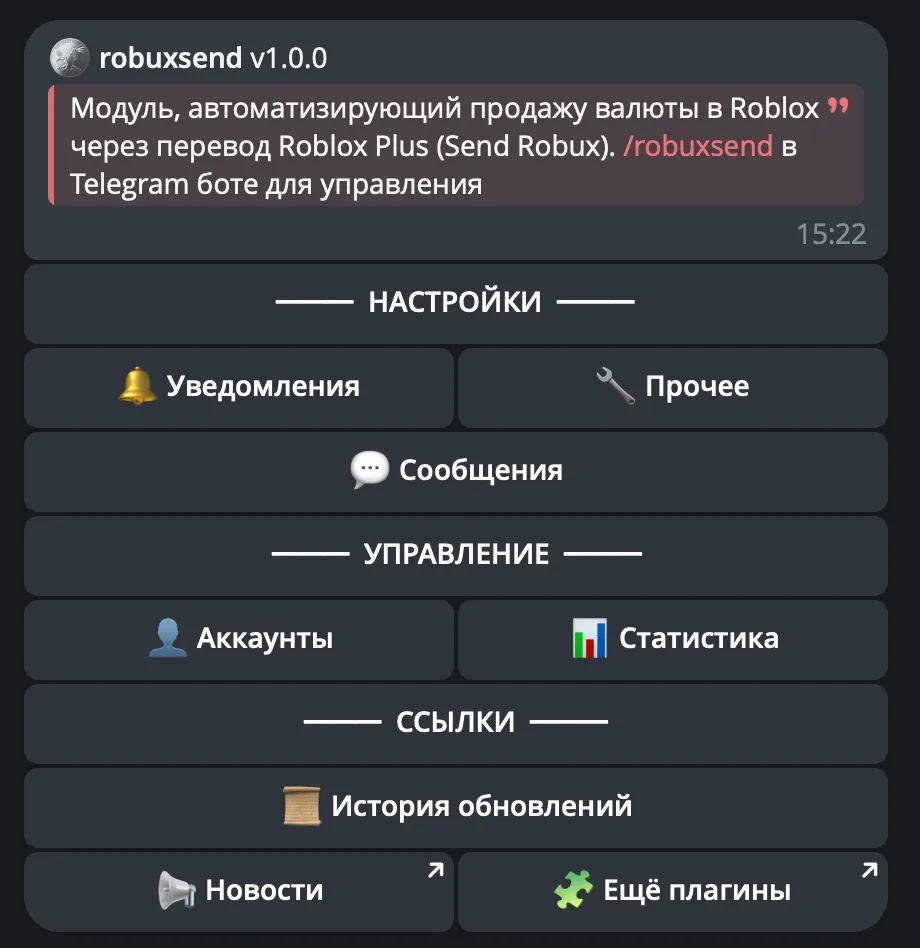
What's included?#
- License
- Issued to your Telegram account
- Bound to your device
- Managed through our bot
- Plugin
- Download it in our bot
- All future updates included
- Tech support
- Help with installation
- Help with proper setup
Price: 3490 RUB / lifetime
To buy, contact — @friedfluoride
The license is lifetime only, there's no way to buy it for a limited time yet
License, refund and support terms are in the license agreement.
How to use#
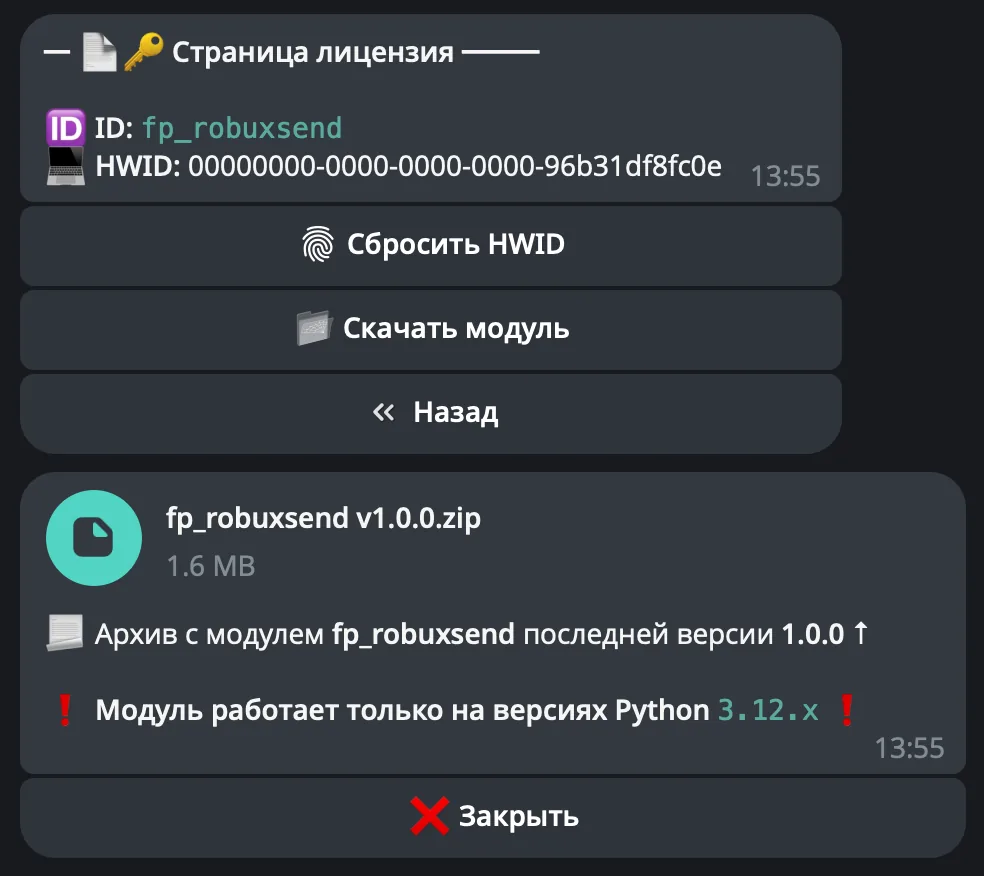
Once you've been issued a license, go to our bot @friedshopbot, send it the /start command, open «🔐 Мои лицензии» (My licenses) in the main menu and tap the license you bought.
The menu that opens lets you manage your license. To download the module, tap the corresponding button and the bot will send you an archive with the module inside as a folder.
Download the Playerok Universal bot if you haven't yet, and run it. Open the main menu, go to «Модули» (Modules) and tap «Импортировать» (Import). Then send the downloaded archive to the bot.
Once the module is imported, restart the bot with the /restart command. After the restart, the /robuxsend command will appear in the Telegram bot — it opens the plugin menu.
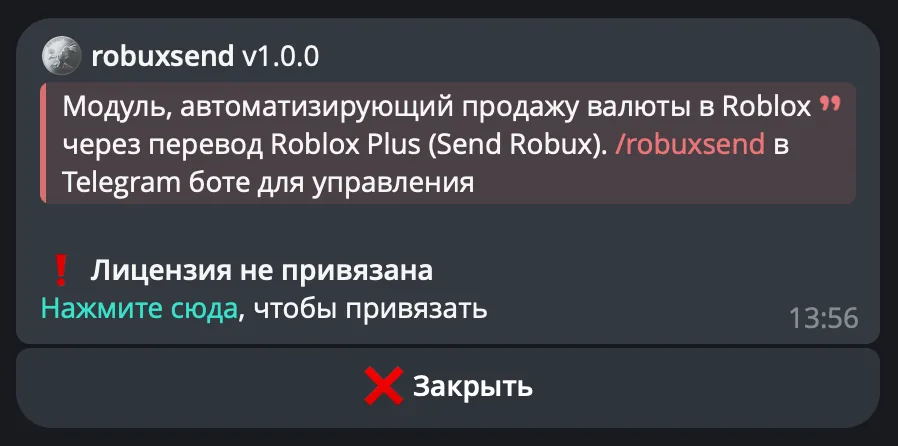
On the first launch you'll need to bind the license to your device. Open the plugin menu and follow the link shown there to do it.
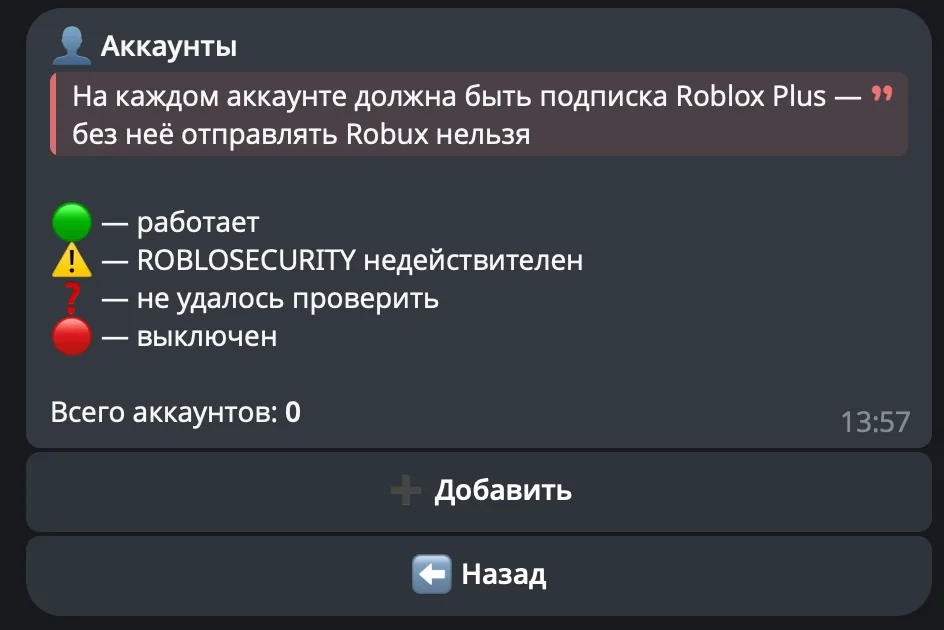
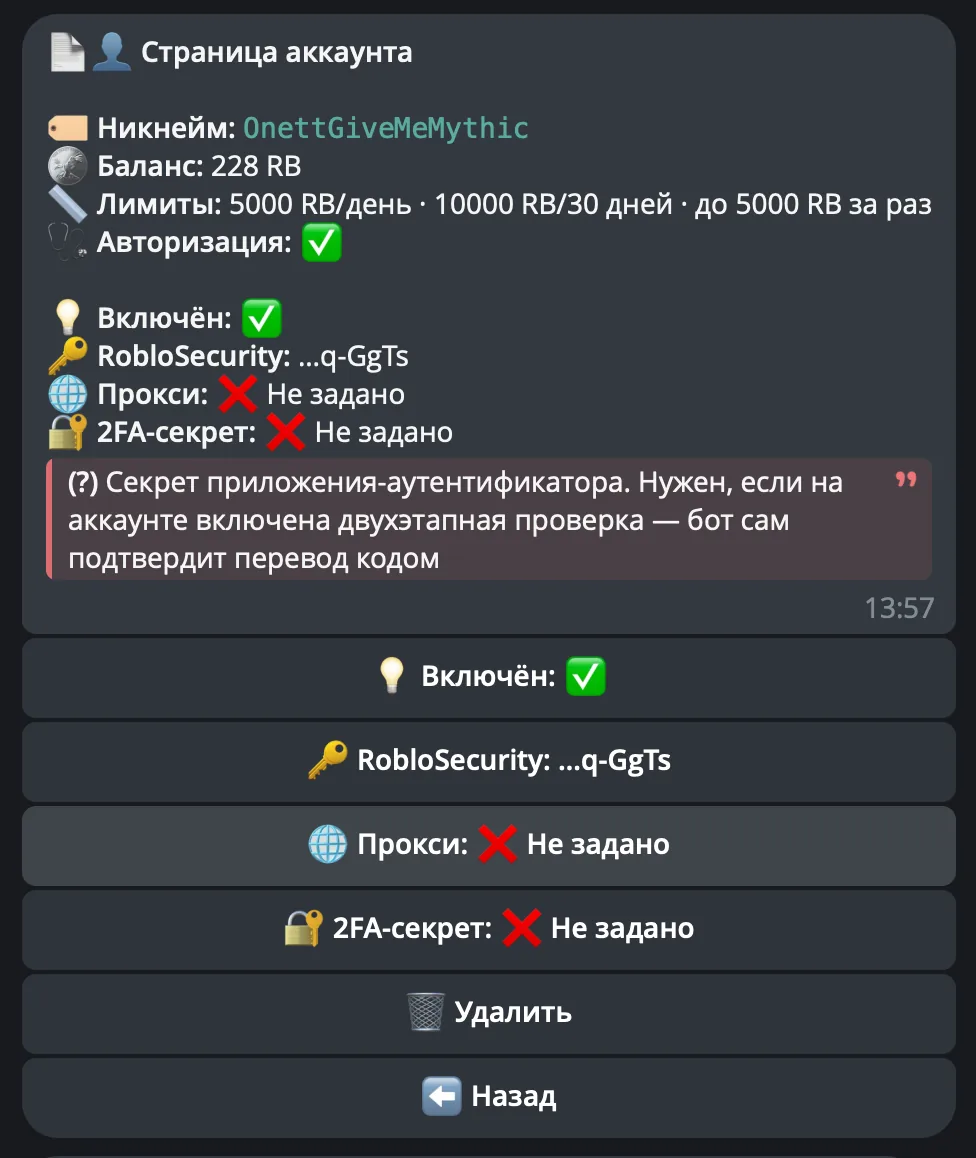
Next, to get started, add the accounts Robux will be sent from. Go to «👤 Аккаунты» (Accounts) → «➕ Добавить» (Add): the bot will ask for the account's ROBLOSECURITY and a proxy (you can skip it with «🚫 Без прокси» (No proxy)).
How to get ROBLOSECURITY (Chrome, Edge):
- Log in to the account on roblox.com in your browser
- Open developer tools (F12 or fn + F12)
- Go to the «Application» tab and open «Cookies» →
https://www.roblox.comon the left. In Firefox and Safari the tab is called «Storage» -
Find the
.ROBLOSECURITYcookie and copy its whole value — including the_|WARNING:-DO-NOT-SHARE-THISpart at the start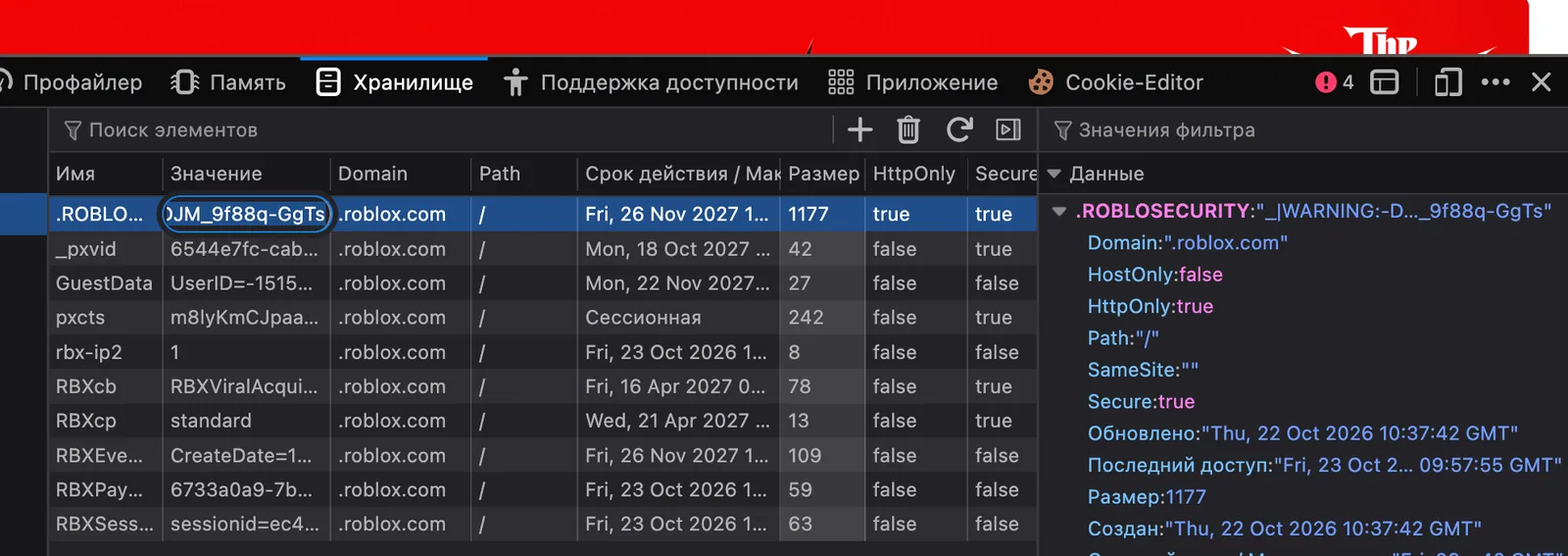
Never share ROBLOSECURITY with anyone — it gives full access to the account. Logging out in the browser or changing the password resets the cookie — the plugin will then notify you that the account dropped off, and you'll need to replace the cookie
On the account page you can set a proxy (IPv4, format user:pass@ip:port or ip:port) — Roblox requests for this account will go through it. If two-step verification through an authenticator app is on for the account, enter the 2FA secret and the bot will confirm transfers with a code by itself.
Now list items on Playerok in the Robux category with the «Roblox Plus» delivery method. The plugin takes the number of Robux from the item's parameters, or from its title if there are none, so write it with the unit: for example, «500 Robux». If the amount can't be determined or the order is for less than 10 Robux, the plugin sends you a notification and won't send Robux — such an order has to be handled by hand.
Unlike the FunPay version, the plugin doesn't turn items on or off by itself. If the accounts run out of Robux while the items are still listed, buyers will get an error and a refund. Keep an eye on the balance notifications and delist the items by hand — the plugin will also remind you about it when sending fails.
If «☑️ Подтверждение» (Confirmation) is on in Playerok Universal, keep these items out of it: in the «Всех товаров» (All items) mode add them to «➖ Исключенные» (Excluded), in the «Указанных товаров» (Selected items) mode don't add them to «➕ Включенные» (Included). Otherwise the bot marks the deal as completed before the plugin sends the Robux.
The balance check threshold is set in «🔔 Уведомления» (Notifications) → «🏦 Порог» (Threshold), where you can also turn the check off.
Before going live, we recommend checking everything in test mode («🔧 Прочее» (Other) → «🧪 Тестовый режим» (Test mode)). The plugin goes through every step except actually sending Robux and marking the deal as completed, so you need a real order (for example, from a second Playerok account) and accounts with a balance. The buyer will get a message about a successful transfer. In test mode the deal isn't marked as completed — after the check, close or refund it on Playerok by hand, otherwise the buyer will get a reminder to confirm the order. Turn the mode off once the test order has been processed.