AutoStars — Telegram Stars auto-delivery
AutoStars — a module for Playerok Universal that automates selling Telegram Stars: it buys stars on Fragment from your TON wallet and sends them to the buyer by username. It also keeps an eye on item prices so they don't go into a loss. Rich functionality, flexible and convenient setup through the Telegram menu.
How does it work?
- The buyer pays for a stars item and enters their Telegram username in the order
- No username in the order — the plugin asks for it in the chat and asks to confirm the order with +/- or да/нет (yes/no)
- The order joins the queue — the buyer sees their place in it
- Before buying, the plugin checks that there's enough TON or USDT in the wallet
- It buys the stars on Fragment from your wallet — they go straight to the buyer's Telegram account. If something fails, it makes up to 3 attempts
- The buyer gets a completion message: the transaction hash, the amount in TON and the date. The plugin confirms on Playerok that the deal is completed
- The purchase failed — the plugin messages you in Telegram with the reason and refunds the order. If auto-refund is off, it asks the buyer for the username again
What do you need?
- A TON wallet — for example, Tonkeeper. The plugin needs its seed phrase of 12 or 24 words, the address is recommended. Wallet versions v3, v4 and W5 are supported
- A balance in TON or USDT — depending on what you pay with. The payment method is switched in the settings, USDT has to be on the TON network
- An account on fragment.com with your Telegram account connected and verification passed — it's available from age 18
- A wallet linked to Fragment — the «Link Wallet» button in your fragment.com profile. Without it, purchases fail with an «unknown error»
- A tonapi.io API key — the plugin works with the wallet through it
- Telegram Stars items delivered by @username — the plugin ignores orders with any other delivery method. It takes the number of stars from the item's attributes: if it can't find it, it doesn't process the order and sends a notification
- You set item prices yourself — the plugin doesn't change them and doesn't take items off sale, it only warns you if a price is no longer profitable
Features
- 🏷️ Username right from the order — the buyer enters it at checkout, no chatting needed
- No username — the plugin asks in the chat and asks to confirm the order
- Orders are processed one by one, with a 40-second pause between purchases so you don't hit Fragment's limits
- After the purchase, the plugin itself confirms on Playerok that the deal is completed
- 🔁 Retries
- A failure during a purchase — up to 3 attempts before reporting an error
- Not enough balance — an error right away, no retries
- 💸 Price check — compares the price of every stars item with the cost price at the Fragment rate
- «❗️ Продаются в убыток» (Selling at a loss) — the item price is below the cost of the stars
- «⚠️ Маржа ниже порога» (Margin below threshold) — the price is above the cost by less than the set threshold in rubles
- Everything comes to Telegram in a single summary with links to the items
- «🔕 Антиспам» (Anti-spam) — a summary with the same items won't repeat sooner than the set interval
- 🛡️ Protection against a wrong exchange rate
- The star rate is taken from Fragment and checked against Binance, CoinGecko and recent star purchases on the TON blockchain
- Sources differ by more than 5% or the rate couldn't be fetched — the price check is skipped until next time
- 🏦 Balance check — a notification if the wallet balance drops below the threshold
- The threshold is set in TON or USDT — depending on the payment method
- 0 — the check is off
- 💳 Payment in TON or USDT
- The payment method is switched with one button
- You can show the recipient that the stars came from you — «👤 От своего имени» (Under your own name)
- ↩️ Automatic refund — can be turned off
- If the stars couldn't be bought: username not found, not enough balance, a Fragment error
- Turned off — the plugin asks the buyer for the username again
- 🔔 Telegram notifications
- Stars couldn't be bought — with the reason and a link to the deal
- Not enough funds in the wallet for an order
- An order wasn't processed: the number of stars couldn't be determined or the Fragment and TON data isn't filled in
- 📢 Notifying buyers — those who received the stars but didn't confirm the order
- On a schedule with a configurable interval
- Manually — with the «🔔 Оповестить незакрытые заказы» (Notify open orders) button
- 💎 Rate and wallet at hand
- The rate of 1 ⭐ in rubles, TON and USDT
- The wallet balance and how many stars it can buy
- 💬 Messages to the buyer
- 8 messages — for every order stage and errors
- Any of them can be edited or turned off
- 📊 Statistics
- For a day, a week, a month and all time
- Orders: total, completed, refunded, amount
- Most common order size and the top item
Managing in Telegram
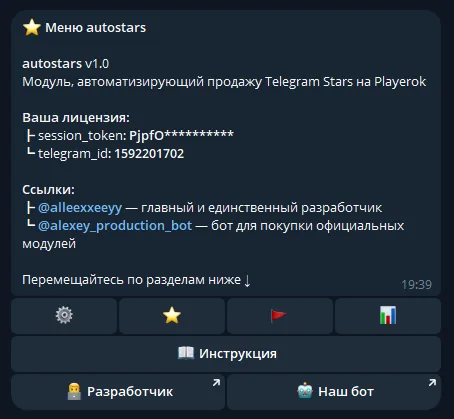
The plugin is fully managed through a dedicated, convenient menu in the TG bot. A full overview of all menu sections is in the YouTube video
The bot menu is in Russian. Button names in this guide are given as they appear in the bot, with a translation in brackets
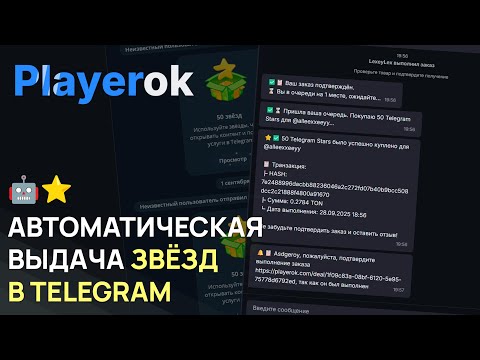
Demo
What's included?
- License
- Issued to your Telegram account
- Bound to your device
- Managed through our bot
- Plugin
- Download it in our bot
- All future updates included
- Tech support
- Help with installation
- Help with proper setup
Price: 3490 RUB / lifetime
To buy, contact — @friedfluoride
The license is lifetime only, there's no way to buy it for a limited time yet
License, refund and support terms are in the license agreement.
How to use
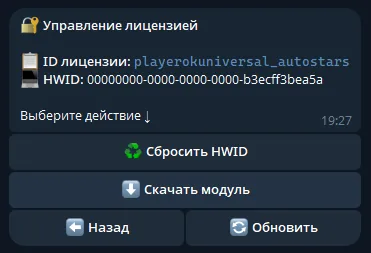
Once you've been issued a license, go to our bot @friedshopbot, send it the /start command, open «🔐 Мои лицензии» (My licenses) in the main menu and tap the license you bought.
The menu that opens lets you manage your license. To download the module, tap the corresponding button and the bot will send you an archive with the module inside as a folder.
Download the Playerok Universal bot if you haven't yet, and run it. Open the main menu, go to «Модули» (Modules) and tap «Импортировать» (Import). Then send the downloaded archive to the bot.
Once the module is imported, restart the bot with the /restart command. After the restart, the /autostars command will appear in the Telegram bot — it opens the plugin menu.
On the first launch you'll need to bind the license to your device. Open the plugin menu and follow the link shown there to do it.
Before setting up, prepare a wallet and a Fragment account:
- Create a Tonkeeper wallet — as a browser extension, an app or through the Telegram mini app. Keep the seed phrase somewhere safe
- Top up the wallet with TON or USDT on the TON network: through @wallet, right in Tonkeeper or on an exchange such as ByBit — that's the best deal: buy USDT for rubles, buy TON for USDT and transfer it to Tonkeeper. Buying on an exchange requires a verified account (passport verification, 18+) — ready-made verification can be bought on LolzMarket
- Sign up on fragment.com, connect your Telegram account and your Tonkeeper wallet there, and pass verification (18+ — fragment.com verification can also be bought on LolzMarket)
Now open the plugin menu and go to «🔐 Кошелёк и API» (Wallet and API). Every time you open the menu, the plugin will remind you if the Fragment Hash, Fragment Cookies, API key or seed phrase isn't filled in, and check that the Fragment login and the wallet work.
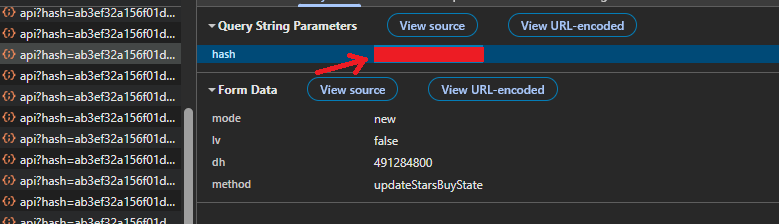
«📜 Fragment Hash» — an 18-character string that's present in any request to fragment.com:
- Open the stars purchase page on Fragment while logged in
-
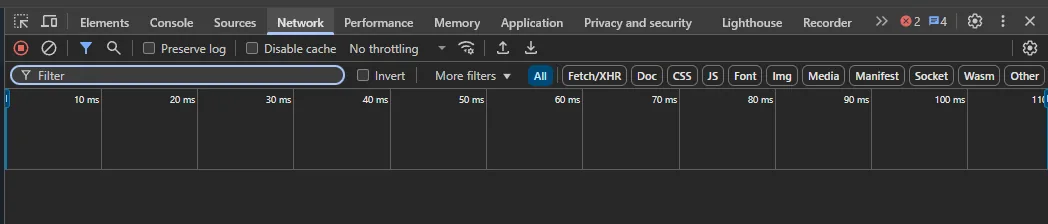
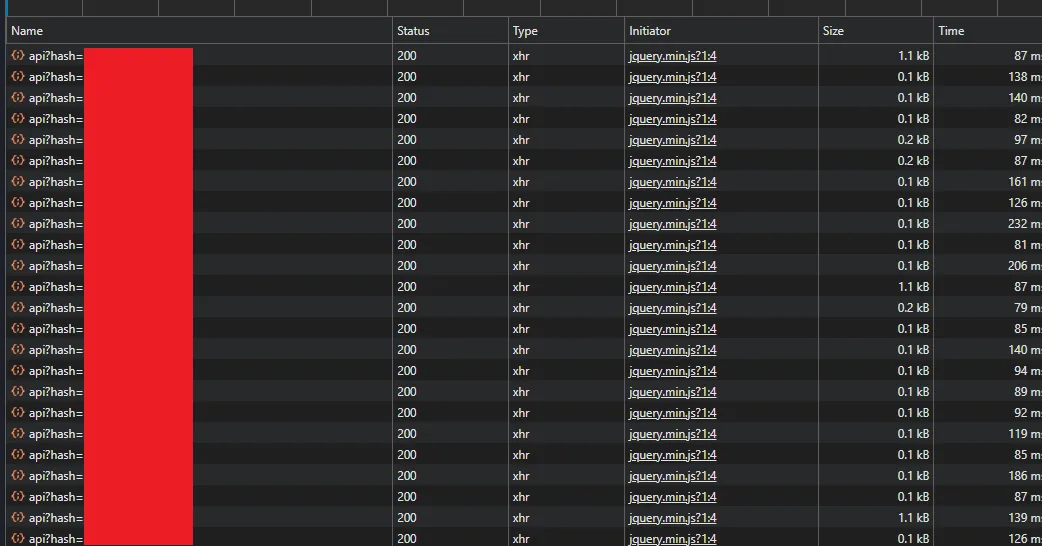
Open developer tools (F12 or fn + F12), the «Network» tab and select the «All» filter
-
Wait a few seconds until api requests appear, as in the screenshot
-
Open any of them — the hash is in the request parameters on the «Payload» tab. Copy it
«🍪 Fragment Cookies» — your Fragment session cookies in Header String format:
- Install the Cookie-Editor extension
- Open fragment.com while logged in and click the extension
-
Hover over «Export» and copy in the «Header String» format — exactly this one. The string must contain
stel_token,stel_dt,stel_ssidandstel_ton_token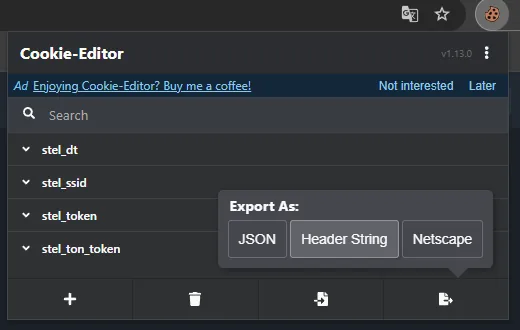
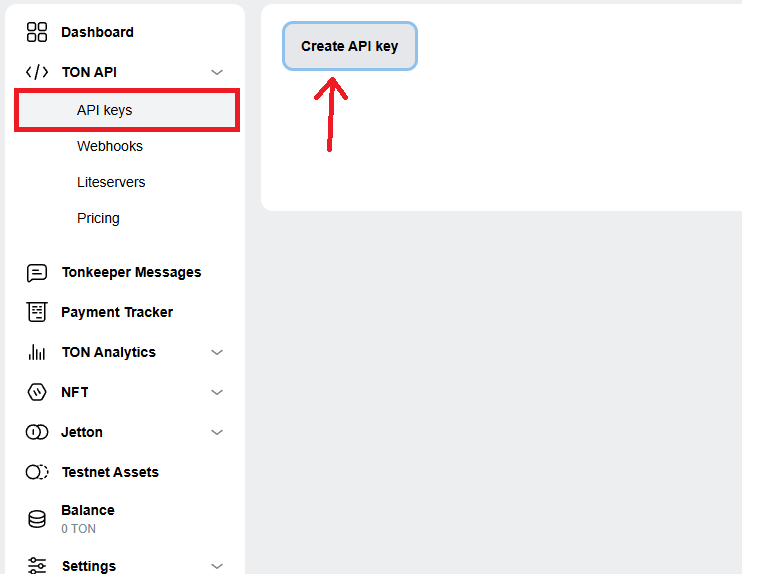
«🔑 API ключ TON» (TON API key) — go to tonapi.io, log in with Telegram and under «TON API» → «API keys» click «Create API key». If you're asked for an expiry period, choose no expiry.
«🪪 Seed фраза» (Seed phrase) — the 12 or 24 words you saved when creating the wallet, separated by spaces: planet star sky vehicle ...
«🏷️ Адрес кошелька» (Wallet address) — in Tonkeeper tap «Получить» (Receive) and «Скопировать адрес» (Copy address). The address tells the plugin which wallet from the seed phrase to use. Without an address, it takes the one with more TON.
The seed phrase gives full access to the wallet — never share it with anyone. If Fragment ends the session, purchases will start failing with the «access denied» error — the plugin will send a notification, and you'll need to update the cookies
In the same section, choose the «💳 Метод оплаты» (Payment method) — 🔷 TON or 💲 USDT TON, whichever the plugin will pay with on Fragment.
Create Telegram Stars items on Playerok delivered by @username and set the prices yourself — the current rate is shown in «💎 Курс звёзд» (Stars rate). It also shows the wallet balance and how many stars it can buy — which doubles as a check that the wallet is connected.
In «🔔 Уведомления» (Notifications), set up the checks:
- «💸 Проверка цен» (Price check) → «🚪 Порог» (Threshold) — the minimum margin in rubles; below it you get a warning
- «🏦 Проверка баланса» (Balance check) → «🏦 Порог» (Threshold) — 0 by default, meaning balance notifications are off. The threshold is counted in the payment method's currency
In «🔧 Прочее» (Other) you can turn off «↩️ Возврат при ошибке» (Refund on error) and set up notifying buyers about open orders.