AutoSteamRental — Steam account auto-rental
AutoSteamRental — a module for FunPay Universal that automates Steam account rental: it gives the buyer the account details and SteamGuard codes, tracks the rental period and changes the account password once it ends. Rich functionality, flexible and convenient setup through the Telegram menu.
How does it work?
- The buyer pays for an offer that has a rental service linked to it
- The plugin takes an available account from the service. None available — it refunds the order and you get a notification in Telegram
- If the category is on the restricted list, the plugin checks the age of the buyer's FunPay account. Too new — refund
- The buyer gets the login, password and rental period. Bought several units — the period is multiplied by the quantity
- The buyer logs in to the account and writes
!steamguard <order ID>in the chat — the plugin sends a SteamGuard code. The rental countdown starts with the first code - Didn't request a code in the allotted time — the plugin refunds the order and changes the password
- 15 minutes before the end the buyer gets a reminder. The rental can be extended with the
!продлить <order ID>(extend) command - Time's up — the plugin changes the password, the buyer's session is closed and the account is available again. The buyer is asked to confirm the order and leave a review
What do you need?
- A maFile for every account — the plugin uses it to get SteamGuard codes and change the password. The file must be unencrypted. How to get it is in the guide below
- The current password — after every rental the plugin changes the password itself and remembers the new one. If you changed the password by hand, update it on the account page in the plugin menu, otherwise the next change will fail
- A FunPay offer for each service — a service is linked to an offer by its link
Features
- 🎮 Rental services — a FunPay offer + rental period + accounts
- The rental period is set per 1 unit
- As many accounts per service as you like
- 👤 Steam accounts
- Added with a login, password and maFile
- Each one shows its status: available or rented
- SteamGuard code right in the bot — with a timer and a refresh button
- Change the password or free up an account by hand, with a button
- Order refunded — the account is freed up and the password is changed
- The password couldn't be changed — the account stays rented and you get a notification
- 🔒 SteamGuard code on command —
!steamguard <order ID>- Only the person who placed the order gets the code
- The rental starts with the first code, the buyer gets the start and end date (MSK)
- 📝 Extending the rental without a new order —
!продлить <order ID>(extend)- The plugin puts up a personal extension offer: 1 unit adds the service's rental period to the rental
- The offer is valid for 15 minutes and is deleted after payment or when it expires
- Once the rental has ended, it can't be extended
- 🔴 Automatic offer deactivation — can be turned off
- All accounts of the service are taken or there are none — the offer is taken off sale
- An account is freed up — the offer is active again
- ↩️ Refund if the buyer didn't log in — can be turned off
- Didn't request a code in the allotted time — the order is refunded and the password is changed
- The time to log in is configurable, 30 minutes by default
- 🛡️ Cheater protection
- Selected FunPay categories have a minimum age for the buyer's account, 180 days by default
- Younger account — refund, no details are given out
- By default the list includes CS2, Dota 2, PUBG, Overwatch 2, Apex Legends and Call of Duty Warzone — the list can be changed
- 🎁 Review bonus — can be turned off
- For a 5-star review the buyer gets extra rental time, 1 hour by default
- Review deleted — the bonus is cancelled
- 🔔 Reminders and notifications
- To the buyer — 15 minutes before the rental ends
- To those whose rental has ended but the order isn't confirmed — on a schedule (once a day by default) or with a button
- To you in Telegram — order errors, failed password changes, no available accounts left, a new plugin version is out
- 💬 Messages to the buyer
- 16 messages — for every rental stage, commands and errors
- Any of them can be edited or turned off
- 📊 Statistics
- For a day, a week, a month and all time
- Orders: total, completed, refunded, amount, top item
Managing in Telegram
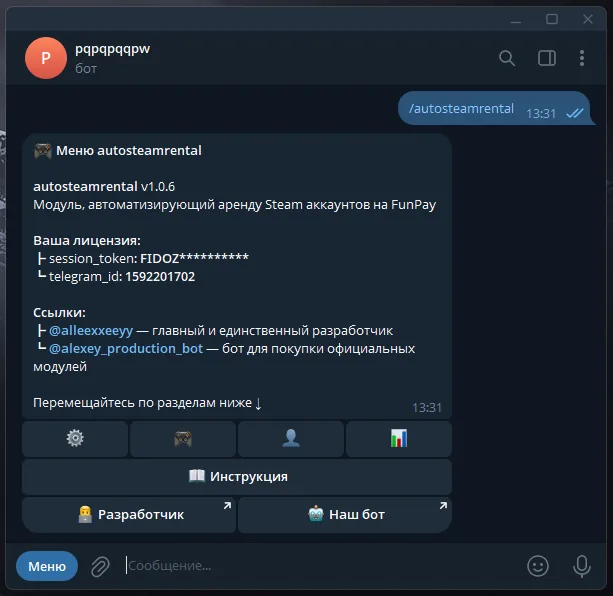
The plugin is fully managed through a dedicated, convenient menu in the TG bot. A full overview of all menu sections is in the YouTube video
The bot menu is in Russian. Button names in this guide are given as they appear in the bot, with a translation in brackets
Demo
What's included?
- License
- Issued to your Telegram account
- Bound to your device
- Managed through our bot
- Plugin
- Download it in our bot
- All future updates included
- Tech support
- Help with installation
- Help with proper setup
Price: 4990 RUB / lifetime
To buy, contact — @friedfluoride
The license is lifetime only, there's no way to buy it for a limited time yet
License, refund and support terms are in the license agreement.
How to use
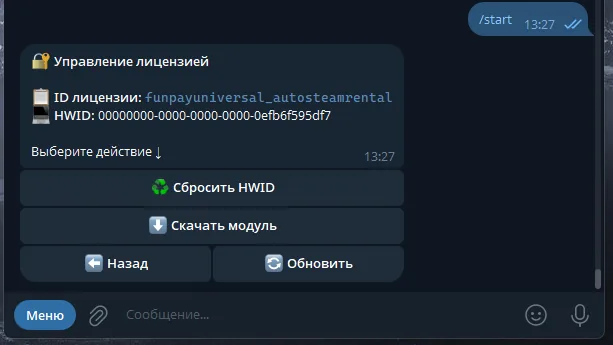
Once you've been issued a license, go to our bot @friedshopbot, send it the /start command, open «🔐 Мои лицензии» (My licenses) in the main menu and tap the license you bought.
The menu that opens lets you manage your license. To download the module, tap the corresponding button and the bot will send you an archive with the module inside as a folder.
Download the FunPay Universal bot if you haven't yet, and run it. Open the main menu, go to «Модули» (Modules) and tap «Импортировать» (Import). Then send the downloaded archive to the bot.
Once the module is imported, restart the bot with the /restart command. After the restart, the /autosteamrental command will appear in the Telegram bot — it opens the plugin menu.
On the first launch you'll need to bind the license to your device. Open the plugin menu and follow the link shown there to do it.
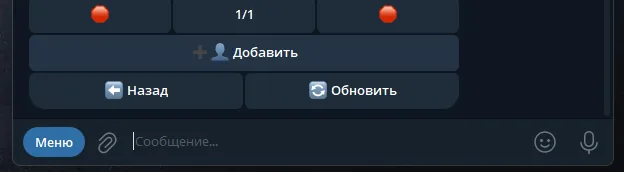
Next, to get started, add the Steam accounts you're going to rent out. Go to «👤 Аккаунты» (Accounts) → «➕ Добавить» (Add): the bot will ask for the account's login, password and maFile. Send the maFile as a file with the .maFile extension.
How to get a maFile — method 1, via Steam Desktop Authenticator (the account must have a phone number linked):
- If the Steam mobile authenticator is linked to the account, unlink it: Steam app → Steam Guard section → turn the protection off
- Install Steam Desktop Authenticator following the instructions on the program's GitHub page
- Open the program and authorize the account — you'll need the codes sent to your email and phone number. After that, login codes will be shown in the program's main window
- Open the folder where Steam Desktop Authenticator is installed, and the
maFilessubfolder inside it. The file you need is named after the account's Steam ID and has the.maFileextension
Method 2, via the Steam Inventory Helper extension (no phone number needed):
- Unlink the Steam mobile authenticator if it's linked — the same way as in method 1
- Install the extension, link the account in it and get the maFile. All the steps are in this video
Don't encrypt the maFile, even if the program offers to — the plugin can't read an encrypted file. Never share the maFile with anyone — it gives access to the account's SteamGuard
Now create a rental service in «🎮 Услуги аренды» (Rental services) → «➕ Добавить» (Add): the bot will ask for a link to the FunPay offer (like https://funpay.com/lots/offer?id=1234567890) and the rental period in seconds — for example, 3600 is 1 hour.
Open the service you created, go to «👤 Аккаунты» (Accounts) and tap the accounts that should be rented out under this offer — the icon of linked ones changes to ✅. You can add as many accounts to one service as you like. While the service has no available accounts, the plugin keeps the offer turned off — you can disable this with «🔄️ Авто-изменение статусов лотов» (Auto-change offer statuses) in «🔧 Прочее» (Other).
Done: when a buyer pays for the offer, the plugin gives them an available account. The time to log in, the review bonus and the account age restriction are configured in «🔧 Прочее» (Other) and «🛡️ Защита» (Protection).