AutoAppRoute — Gift cards, keys, currency, game top-ups
AutoAppRoute — a module for FunPay Universal that automates reselling all AppRoute (approute.io) services: gift cards, keys, in-game currency and direct top-ups. Offer prices follow AppRoute automatically, plus your markup. Rich functionality, flexible and convenient setup through the Telegram menu.
How does it work?
- You link your FunPay offer to an AppRoute product in «💲 Услуги» (Services). The plugin detects the mode — «Магазин» (Shop) or «Прямое пополнение» (Direct top-up) — from the product by itself
- The buyer pays for the order on FunPay
- For «Прямое пополнение» (Direct top-up) the plugin asks the buyer for the details (for example: account ID, server ID), asks them to confirm and checks them on AppRoute. For «Магазин» (Shop) this step is skipped
- It compares the order price with the purchase price on AppRoute — if the offer sold for less than the purchase price, the plugin won't fulfill the order. That's «🛡️ Защита от убытка» (Loss protection)
- It creates an order on AppRoute — the buyer gets its ID, status and the
!ar_infocommand to check it - If AppRoute doesn't complete the order right away, the plugin tracks its status by itself
- Order completed — the buyer gets the codes in «Магазин» (Shop) mode or a message about a successful top-up
- An error or cancellation on AppRoute — the buyer gets a message, you get a notification in Telegram, and the order is refunded if auto-refund is on
What can you sell?
- 🎁 Gift cards
- 🔑 Game and software keys
- 🪙 In-game currency
- 💰 Direct top-ups (games, services, Steam and more)
2 modes
«Магазин» (Shop)
- Once the order is paid on FunPay, an order on AppRoute is created right away — for the quantity that was bought
- ✅ If the order succeeds on AppRoute, the buyer gets a message with the received goods (vouchers/gift codes)
- ❌ If the order fails on AppRoute, the buyer gets a message with the error, and you get a TG notification with full details about the error. The order is also refunded automatically if auto-refund is on
«Прямое пополнение» (Direct top-up)
- Once the order is paid on FunPay, the buyer has to fill in the fields needed to deliver the order (for example: account ID, server ID). They don't have to enter the fields you've filled in beforehand
- Each value is checked for format right away. Made a mistake — the plugin asks to enter that field again
- When done, the buyer confirms the input (+/- or да/нет — yes/no). Declined — they fill in the fields again
- After confirmation, the data is validated on AppRoute
- ✅ If the data is valid, an order is created on AppRoute with this data
- ✅ If the order succeeds on AppRoute, the buyer gets a message that it's done
- ❌ If the order fails on AppRoute, the buyer gets a message with the error, and you get a TG notification with full details about the error. The order is also refunded automatically if auto-refund is on
- ❌ If the data isn't valid, the buyer gets a message with the reason from AppRoute
What do you need?
- AppRoute API key — with a whitelist of the IPs the bot runs from
- AppRoute balance in USD — orders are paid from it. The plugin also uses it to decide which offers to keep active
- Your own offers on FunPay — the plugin doesn't create offers, it works with the ones already listed: you link each offer to an AppRoute product
Features
- 💰 Automatic price changes — the prices of all your offers are changed to the current AppRoute prices plus your markup
- Formula: *AppRoute price converted to rubles at the Central Bank of Russia rate* + *markup in %*
- The cost of a Steam top-up is calculated at the AppRoute rate for the offer's currency
- Flexible markups: general, per service, per product
- Configurable change interval
- Manual price change in the TG menu
- 📝 Automatic offer activation/deactivation — if your AppRoute balance isn't enough to sell a particular service, the bot deactivates that offer and activates it again once the money is back on the balance
- A «Магазин» (Shop) product is out of stock on AppRoute — the offer turns off too
- Automatic quantity sync: the quantity in an offer with a «Магазин» (Shop) product is set to how many of these products AppRoute has in stock (AppRoute has 500 of one product — your FunPay offer will have 500 too)
- Turned on and off with the «🔃 Изменение статусов» (Status changes) toggle
- 🛡️ Loss protection — can be turned off
- The order price on FunPay turned out lower than the purchase price — the bot won't fulfill the order
- It tells the buyer about the error and deactivates the offer, and refunds the money if auto-refund is on
- You get a TG notification
- ✏️ Flexible fields for «Прямое пополнение» (Direct top-up)
- Some fields can be filled in beforehand — the buyer enters only the rest
- Field names are translated into Russian automatically, and you can change them
- A field with a list of options — the buyer picks a number from the list
- The buyer doesn't fill in the
amountfield: if you haven't set it yourself, it equals the quantity in the order
- 📢 Notifying buyers — everyone whose orders are completed but not confirmed gets a request to confirm the order
- Configurable notification interval
- Manual notification from the TG menu
- 🔔 Telegram notifications
- On an order error
- When an order is canceled or partially completed on AppRoute
- When an offer is turned off due to low balance and when it's turned back on
- ↩️ Automatic refund on errors on AppRoute's side
- Can be turned on/off
- 💬 Messages to the buyer
- 17 messages — for every order stage and errors
- Any of them can be edited or turned off
- The buyer checks the order status with the
!ar_info #order IDcommand
- 📋 AppRoute orders in TG — the last 200 orders of your account: status, amount, voucher codes
- 🤝 Works with AutoDumping — if an offer's price is managed by AutoDumping, the plugin leaves it alone and passes the current purchase price to it
- 📊 Sales statistics
- For a day/week/month/all time
- Total orders, completed, refunded
- Total order amount
- Best product — the best-selling one
Managing in Telegram
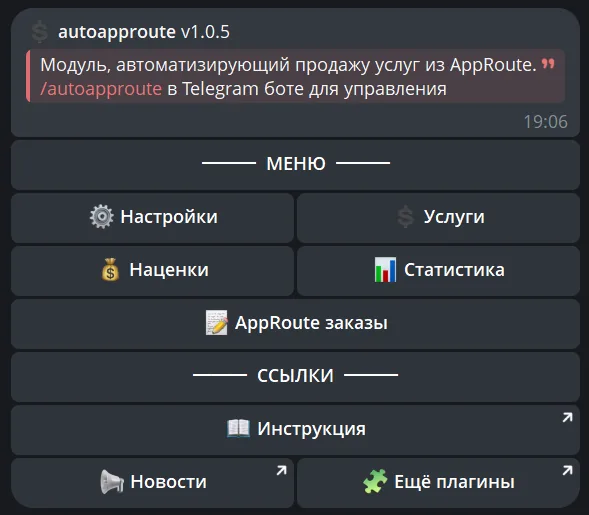
The plugin is fully managed through a dedicated, convenient menu in the TG bot. A full overview of all menu sections is in the YouTube video
The bot menu is in Russian. Button names in this guide are given as they appear in the bot, with a translation in brackets
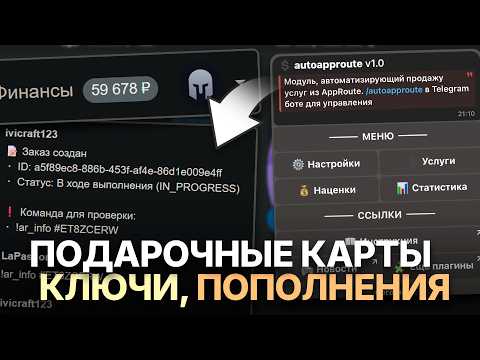
Demo
What's included?
- License
- Issued to your Telegram account
- Bound to your device
- Managed through our bot
- Plugin
- Download it in our bot
- All future updates included
- Tech support
- Help with installation
- Help with proper setup
Price: 3490 RUB / lifetime
To buy, contact — @friedfluoride
The license is lifetime only, there's no way to buy it for a limited time yet
License, refund and support terms are in the license agreement.
How to use
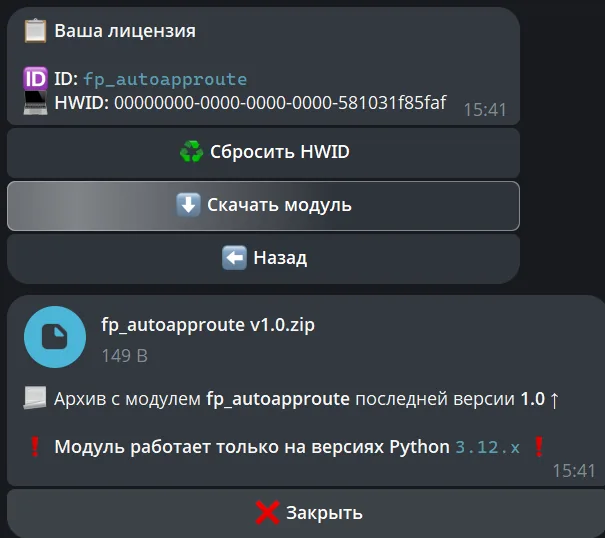
Once you've been issued a license, go to our bot @friedshopbot, send it the /start command, open «🔐 Мои лицензии» (My licenses) in the main menu and tap the license you bought.
The menu that opens lets you manage your license. To download the module, tap the corresponding button and the bot will send you an archive with the module inside as a folder.
Download the FunPay Universal bot if you haven't yet, and run it. Open the main menu, go to «Модули» (Modules) and tap «Импортировать» (Import). Then send the downloaded archive to the bot.
Once the module is imported, restart the bot with the /restart command. After the restart, the /autoapproute command will appear in the Telegram bot — it opens the plugin menu.
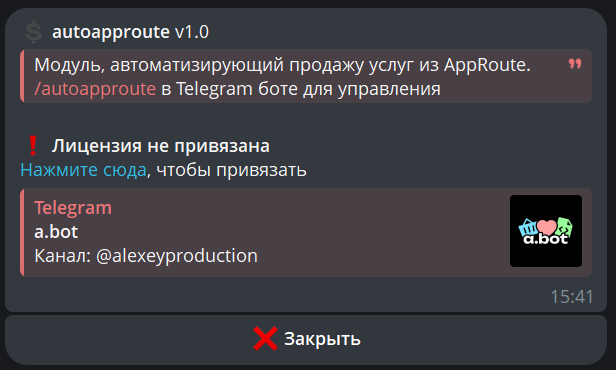
On the first launch you'll need to bind the license to your device. Open the plugin menu and follow the link shown there to do it.
After that, set the API key the plugin will work with: «🔒 API AppRoute» (AppRoute API) → «🔑 API ключ» (API key). You create the key in the corresponding section on AppRoute. The bot checks the key right away and tells you if it couldn't log in with it.
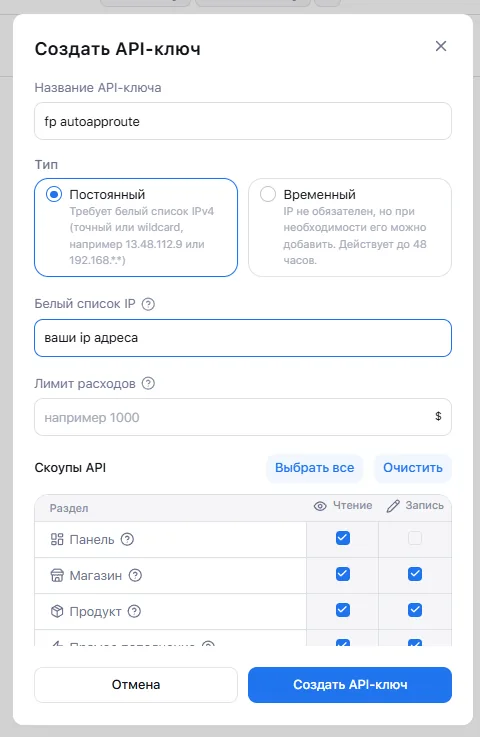
Be sure to add all your IP addresses (including the IPs of any VPN you use).
Next, link your offers to AppRoute products: «💲 Услуги» (Services) → «➕ Добавить» (Add). Send an offer link like https://funpay.com/lots/offer?id=1234567890, pick the service and product («🔍 Поиск» (Search) finds them faster) and confirm. The plugin detects the mode — «Магазин» (Shop) or «Прямое пополнение» (Direct top-up) — by itself.
For «Прямое пополнение» (Direct top-up), the service page has «✏️ Настроить значения» (Set values): the buyer won't have to enter the fields you fill in here, and will fill in the empty ones (❌) after the purchase. In «🏷️ Изменить названия» (Edit names) you can change how the fields are named in messages to the buyer. For Steam top-ups, check «💵 Валюта» (Currency) — if the FunPay offer has «Тип валюты» (Currency type) set, the currency is taken from the offer automatically, otherwise pick it by hand: USD, RUB, KZT or UAH.
Now set your markup in «💰 Наценки» (Markups). «🌐 Общая» (General, 3% by default) applies to all offers, a service markup overrides it, and a markup on a single product overrides both. Prices update on their own at the interval set in «🔔 Уведомления» (Notifications) — once an hour by default — or right away with the «💸 Изменить цены» (Change prices) button in the same section.
In «🔧 Прочее» (Other), check «↩️ Возврат при ошибке» (Refund on error), «🛡️ Защита от убытка» (Loss protection) and «🔃 Изменение статусов» (Status changes) — all of them are on by default.